YOUR SCREEN. YOUR STORY. YOUR COMPUTER.

A little recording.
A much better demo.

Turn everyday screen recordings into something worth watching. Smooth zooms, a beautiful frame, and your voice. All on your computer.

Windows desktop · Fully local · $9 lifetime at launch

TOURO RECORDER / THE LOCAL STUDIO01 — MAKE THE DETAILS MATTER
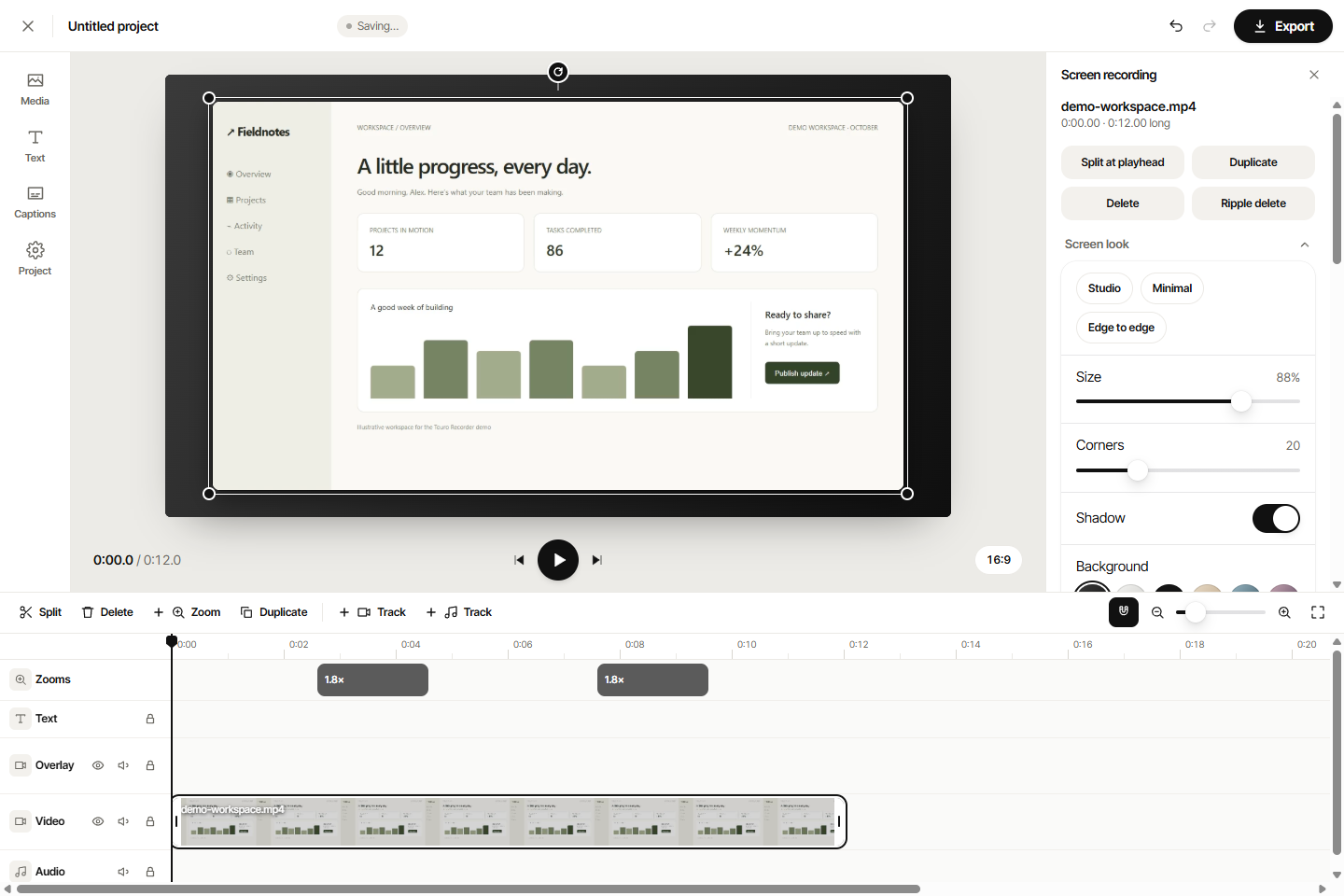
Actual Touro Recorder editor with screen preview, editable zoom timeline, and framing controlsActual editor · sample recording
✳ Automatic click zooms◌ Screen + webcam↗ MP4 & WebM export⌁ Zero media uploads

LESS FIXING. MORE SHOWING.

Your work deserves
a better close-up.

Product demos. Quick tutorials. That one thing you keep explaining. Record it once, guide the viewer to what matters, and keep the file.

01 / AUTOMATIC ZOOMS

The important part, front and center.

The Windows app tracks your clicks during recording. Turn them into smooth zooms, then adjust the focus, strength and timing yourself. Click clusters, cursor pauses and typing activity guide the camera; fast cursor travel stays wide.

02 / ACTUALLY LOCAL

Your studio. No server.

Record, edit and export without an internet connection. No signup, upload queue or monthly processing credits.

03 / YOUR SIGNATURE LOOK

Make a rough take feel finished.

Add a webcam bubble. Choose from fifteen backgrounds. Adjust the corners and shadow. Trim the beginning and export a clean video.

FROM “LET ME SHOW YOU” TO DONE

Three steps.
One small studio.

Keep your attention on the story. The recorder takes care of the frame.

01

Choose your screen.

Select a display, switch on your microphone or webcam, and record. Pause whenever you need a moment.

02

Give it your finish.

Review automatic zooms, trim your clip and choose a Studio, Minimal or Edge to edge look. Everything is editable.

03

Keep the actual file.

Export MP4 or WebM on your computer. Upload it wherever you want, whenever you’re ready.

A TOOL YOU CAN KEEP

One payment.
Lots of “let me show you.”

A standalone Windows app for people who would rather make things than manage another subscription.

PLANNED LAUNCH OFFER
$9 USD / lifetime

One-time purchase. No recurring fee.

  • Standalone Windows recorder
  • Automatic zooms & editable click highlights
  • Screen, microphone & webcam capture
  • Local editing and MP4 / WebM export
  • No account or cloud processing required
Desktop launch coming soonCheckout is not open yet. Try the browser editor below.
Try the browser editor ↓Windows x64. Mac and Linux are not available. Captions open the separate online VideoTouro app and require internet.

GET A FEEL FOR IT

Bring a recording.
Make it yours.

Try recording or open a video below. Browser recordings support manual zooms; automatic click tracking requires the desktop app.

Record your screen

Smooth zooms, click highlights, a webcam bubble and a nice frame, edited right after. Add zooms with one click (the desktop app makes them automatically from your clicks).

Automatic zooms from your clicks: use Touro Recorder for Windows. It follows your mouse while you record anything on your computer, fully offline. $9 lifetime at launch. Standalone Windows download coming soon.

Frequently asked questions

Is this the whole VideoTouro toolkit?

No. Touro Recorder has its own installer and app. It includes the recording and editing workflow, without the website’s other tool pages.

Does the desktop app really work offline?

Yes. Screen capture, mouse tracking, framing, editing and export run locally. The app blocks external web requests. Captions are separate: the Captions button opens the online VideoTouro app in its own window. No recording is transferred automatically.

What is the difference between the browser and desktop?

The browser is a free way to try the editor. The Windows app adds display selection, system-wide click tracking, a floating stop control and offline operation.

Can I buy it now?

Not yet. $9 is the planned lifetime launch price. A purchase link will appear here when the release and checkout are ready.

Will it record system sound?

The Windows app supports system audio and microphone mixing. Browser sound capture depends on the browser and the screen or tab you select.